

Steppers
The row every adjustable setting uses: a - glyph, a slider track and a +
glyph in one row, with a name and a number on the line above. A stepper holds
no state. It draws the value it is given and sends the screen a message,
whether a finger taps a glyph or drags the track, or a key nudges the value.
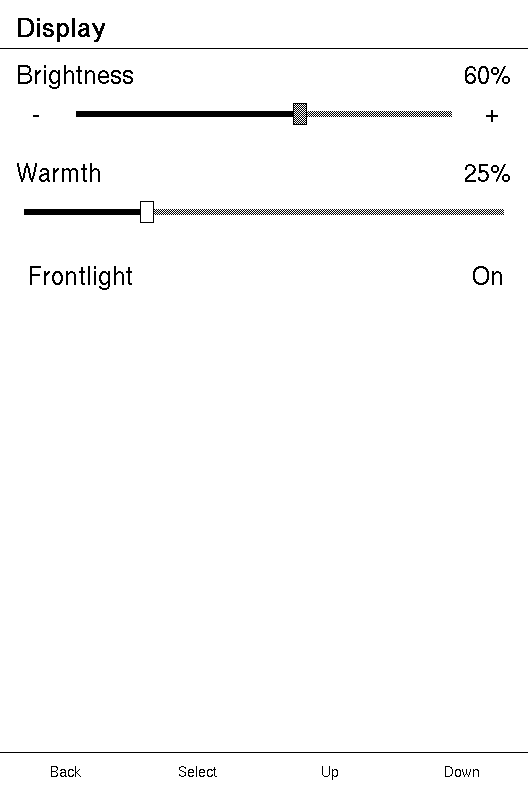
The tutorial builds a screen around a Stepper and a
Toggle from nothing. How a control is driven
covers the focus, the value mode and the keys a stepper shares with a slider.
This page is what a stepper does.
Topics
Section titled “Topics”Stepper | The row every adjustable setting uses: fine steps at each end, a draggable track between them. |
Stepper
Section titled “Stepper”The row every adjustable setting uses: fine steps at each end, a draggable track between them.
pub struct Stepper<M>
A stepper is a - glyph, a Slider and a + glyph in one row,
centred on each other, with the line above for a name and a number. The glyphs
are framed to a square one list row tall, and widened to the theme's minimum
touch target, so a one-character - is still easy to hit.

A composite is one focus stop. A stepper offers three touch targets, -,
the track and +, but a single stop for the keys, so Up and Down move between
settings rather than through glyphs. The glyphs are touch-only and the track
takes no focus of its own.
| Builder | Sets | When not called |
|---|---|---|
on_change | the absolute value: the track, the glyphs and the keys send it, and an edit commits it | the track is display-only, and an edit never opens |
on_step | a relative nudge for the glyphs and Left/Right, in place of on_change | the glyphs and the keys send on_change, one step from the value |
title | the name on the line above | no name |
readout | the number on the line above, with its unit | no number |
on_change is enough. Given it alone, a stepper is a focus stop, draws both
glyphs, and answers every input: the track sends the value under the finger,
each glyph and Left or Right send the value one step either side, held inside
0..=max, and an open edit commits through it. Add
on_step only when a step should be worth what the screen
decides. With only on_step it can be nudged but never opened, so a device
without a Left/Right pair cannot change it. With neither it is display-only: no
glyphs and no focus stop.
Example — only on_change, driven by the keys
use xpui::screen::{Driver, Runtime};use xpui::{Button, NavigationScreen, Screen, Stepper, View, testing};
#[derive(Clone, Copy)]enum Msg {  Contrast(i32),}
struct Contrast {  level: i32,}
impl Screen for Contrast {  type Message = Msg;
  fn body(&self) -> impl View<Msg> {    NavigationScreen::new(Stepper::ranged(self.level, 10).on_change(Msg::Contrast).title("Contrast"))  }
  fn update(&mut self, message: Msg) {    let Msg::Contrast(level) = message;    self.level = level;  }
  fn title(&self) -> Option<&'static str> {    Some("Display")  }}
testing::install();testing::reset();testing::set_has_left_right_keys(true);let mut runtime = Runtime::new(Contrast { level: 9 });runtime.render();
let drawn: Vec<String> = testing::drawn_text().into_iter().map(|(_, _, text, _, _)| text).collect();assert!(drawn.iter().any(|text| text == "-") && drawn.iter().any(|text| text == "+"), "both glyphs");
for _ in 0..2 {  testing::press(Button::Right);  runtime.loop_();}assert_eq!(runtime.screen().level, 10, "one step up, then held at the top of the range");
A stepper has no without_focus: it is the larger control that owns the stop.
Example — a brightness setting
use xpui::{NavigationScreen, Screen, Stepper, View};
#[derive(Clone, Copy)]enum Msg {  Brightness(i32),     // an absolute value, from the track or a closed edit  BrightnessStep(i32), // -1 or +1, from a glyph or Left/Right}
struct Display {  brightness: i32,}
impl Screen for Display {  type Message = Msg;
  fn body(&self) -> impl View<Msg> {    NavigationScreen::new(      Stepper::new(self.brightness)        .on_change(Msg::Brightness)        .on_step(Msg::BrightnessStep)        .title("Brightness")        .readout("%"),    )  }
  fn update(&mut self, message: Msg) {    match message {      Msg::Brightness(value) => self.brightness = value.clamp(0, 100),      Msg::BrightnessStep(delta) => {        self.brightness = (self.brightness + delta).clamp(0, 100)      }    }  }
  fn title(&self) -> Option<&'static str> {    Some("Display")  }}
let mut screen = Display { brightness: 60 };screen.update(Msg::BrightnessStep(1));assert_eq!(screen.brightness, 61);
Example — a plain track with steps
With no title and no readout there is no line above, and the stepper is one list row tall.
use xpui::Stepper;
#[derive(Clone, Copy)]enum Msg {  Set(i32),  Step(i32),}
let contrast = 50;let stepper: Stepper<Msg> = Stepper::new(contrast).on_change(Msg::Set).on_step(Msg::Step);
Creating a stepper
Section titled “Creating a stepper”Stepper::new
Section titled “Stepper::new”A stepper over 0..=100.
pub fn new(value: i32) -> SelfStepper::ranged
Section titled “Stepper::ranged”A stepper over 0..=max.
pub fn ranged(value: i32, max: i32) -> Self| Parameter | Meaning |
|---|---|
value | What it reads now. |
max | The top of the range, which an open edit is held inside. The bottom is always 0. |
Example — minutes up to two hours
use xpui::{NavigationScreen, Screen, Stepper, View};
#[derive(Clone, Copy)]enum Msg {  SetMinutes(i32),  StepMinutes(i32),}
struct SleepTimer {  minutes: i32,}
impl Screen for SleepTimer {  type Message = Msg;
  fn body(&self) -> impl View<Msg> {    NavigationScreen::new(      Stepper::ranged(self.minutes, 120)        .on_change(Msg::SetMinutes)        .on_step(Msg::StepMinutes)        .title("Sleep after")        .readout(" min"),    )  }
  fn update(&mut self, message: Msg) {    match message {      Msg::SetMinutes(value) => self.minutes = value.clamp(0, 120),      Msg::StepMinutes(delta) => self.minutes = (self.minutes + delta).clamp(0, 120),    }  }
  fn title(&self) -> Option<&'static str> {    Some("Sleep timer")  }}
Responding to input
Section titled “Responding to input”Stepper::on_step
Section titled “Stepper::on_step”Sends make(-1) or make(+1) from the end glyphs and the Left/Right keys.
pub fn on_step(self, make: fn(i32) -> M) -> Self| Parameter | Meaning |
|---|---|
make | Builds the message from -1 or +1. The screen adds it to what it holds. |
Optional. Without it the glyphs and the keys send
on_change one step from the value, so give it only when
a step should be worth something the screen decides. What a step is worth is
then the screen's to decide, since it does the adding, but only outside an
edit: inside one, the framework moves its copy by one unit of the range, and
commits through on_change. Given both, on_step takes the glyphs and the
keys, and on_change keeps the track and the edit.
Example — a step worth five
use xpui::screen::{Driver, Runtime};use xpui::{Button, NavigationScreen, Screen, Stepper, View, testing};
#[derive(Clone, Copy)]enum Msg {  Set(i32),  Step(i32),}
struct Frontlight {  level: i32,}
impl Screen for Frontlight {  type Message = Msg;
  fn body(&self) -> impl View<Msg> {    NavigationScreen::new(Stepper::new(self.level).on_change(Msg::Set).on_step(Msg::Step))  }
  fn update(&mut self, message: Msg) {    match message {      Msg::Set(value) => self.level = value.clamp(0, 100),      Msg::Step(delta) => self.level = (self.level + 5 * delta).clamp(0, 100),    }  }
  fn title(&self) -> Option<&'static str> {    Some("Frontlight")  }}
testing::install();testing::reset();
// With the pair, Right is a nudge, and the screen makes it five.testing::set_has_left_right_keys(true);let mut runtime = Runtime::new(Frontlight { level: 40 });runtime.render();testing::press(Button::Right);runtime.loop_();assert_eq!(runtime.screen().level, 45);
// Without it, an edit moves by one and commits an absolute value.testing::set_has_left_right_keys(false);for key in [Button::Confirm, Button::Up, Button::Confirm] {  testing::press(key);  runtime.loop_();}assert_eq!(runtime.screen().level, 46);
Stepper::on_change
Section titled “Stepper::on_change”Sends make(new_value) when the track is dragged or tapped.
pub fn on_change(self, make: fn(i32) -> M) -> SelfIt is also what an open edit commits, so a stepper without it can be nudged but
never opened. Without on_step, the glyphs and Left and
Right send it too, with the value one step either side, held inside the range.
The line above the row
Section titled “The line above the row”Stepper::title
Section titled “Stepper::title”Names the control on the same line as its number.
pub fn title(self, title: impl Into<String>) -> SelfSee Slider::title.
Stepper::readout
Section titled “Stepper::readout”Draws the value as a number on the line above the row, at its trailing edge — beside title when there is one.
pub fn readout(self, suffix: &'static str) -> SelfThe number follows an open edit, as Slider::readout does:
the stepper's number and its track always agree.
See also: Slider, the value mode