

Navigation
How a screen opens another and closes itself, and the two roots that give a
screen its header and its button hints. A screen never touches a stack. It asks,
from update, and whoever owns the stack acts once the frame is over.
Topics
Section titled “Topics”present | Pushes screen on top of the current one. |
finish_screen | Pops the current screen. |
NavigationScreen | The root view for a screen pushed onto the activity stack. |
OverlayPanel | The root view for a panel that drops over whatever is already on screen. |
Hint | One button-hint slot. |
HintWord | Which of a host's own words a hint slot is asking for. |
Navigator | The navigation a screen sits inside. |
A walkthrough: opening a second screen
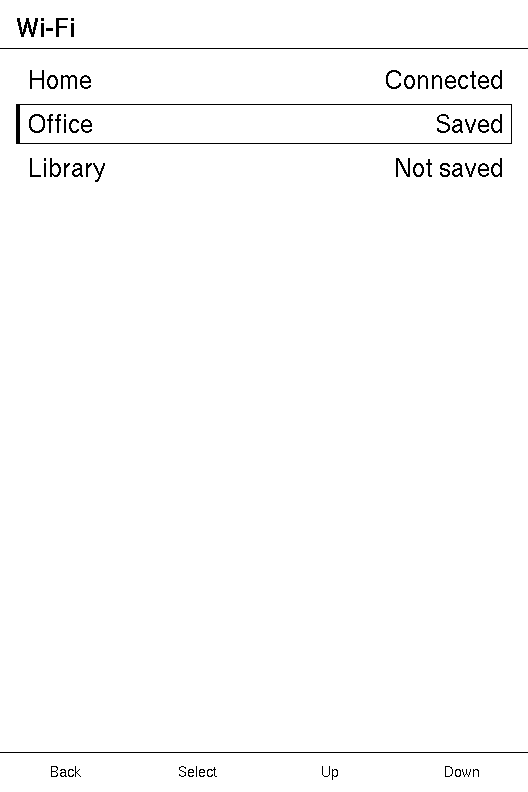
Section titled “A walkthrough: opening a second screen”A list of Wi-Fi networks where selecting one opens a screen about that network,
and Back returns to the list. Three things do all the work: each row carries its
index as its message, update calls present, and Back is left to
the runtime. A second screen builds the same shape a
step at a time.
use xpui::{App, Button, List, ListRow, NavigationScreen, Screen, View, present, testing};
/// Each network's name, and what the list says about it.const NETWORKS: [(&str, &str); 3] = [("Home", "Connected"), ("Office", "Saved"), ("Library", "Not saved")];
struct Networks;
impl Screen for Networks {  type Message = usize; // the index of the row selected
  fn body(&self) -> impl View<usize> {    NavigationScreen::new(List::new().extend(NETWORKS.iter().enumerate().map(      |(index, (name, status))| ListRow::new(*name).value(*status).on_tap(index),    )))  }
  fn update(&mut self, index: usize) {    present(Network { index });  }
  fn title(&self) -> Option<&'static str> {    Some("Wi-Fi")  }}
struct Network {  index: usize,}
impl Screen for Network {  type Message = ();
  fn body(&self) -> impl View<()> {    let (_, status) = NETWORKS[self.index];    NavigationScreen::new(      List::new()        .push(ListRow::new("Status").value(status))        .push(ListRow::new("Security").value("WPA2")),    )  }
  fn update(&mut self, _message: ()) {}
  fn title(&self) -> Option<&'static str> {    Some(NETWORKS[self.index].0)  }}
testing::install();let mut app = App::new(Networks);app.render();assert_eq!(app.depth(), 1);
// Down moves the focus from Home to Office.testing::press(Button::Down);app.tick();app.render_if_dirty();
// Confirm sends Office's message, and the push lands once the frame is over.testing::press(Button::Confirm);app.tick();assert_eq!(app.depth(), 2);testing::reset();app.render_if_dirty();assert_eq!(testing::drawn_headers(), [Some("Office".to_string())]);
// Back, which the screen does not claim, finishes it.testing::press(Button::Back);app.tick();assert_eq!(app.depth(), 1);testing::reset();app.render_if_dirty();assert_eq!(testing::drawn_lists(), [(3, 1)], "the list again, focus still on Office");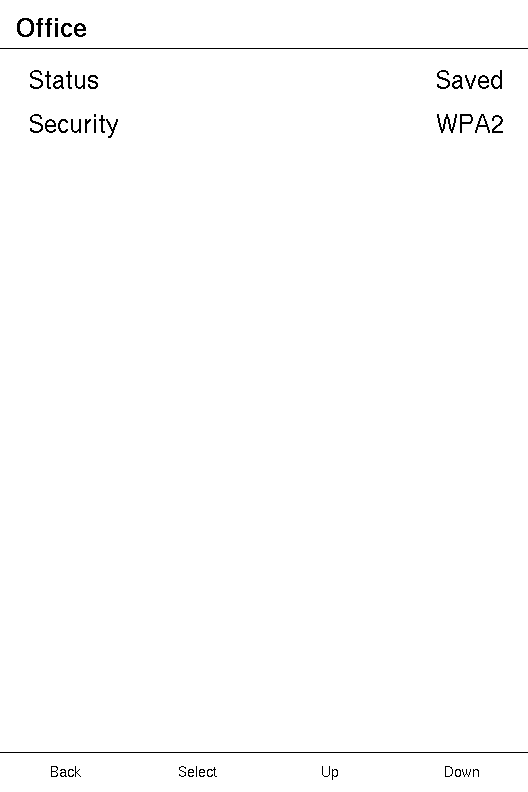
| Frame | Input | What happens | Depth |
|---|---|---|---|
| 1 | Down | The runtime moves the focus from Home to Office and asks for a repaint. | 1 |
| 2 | Confirm | Office's row sends 1, update presents a Network, and App::tick pushes it after the frame. | 2 |
| 3 | Back | Network does not claim the key, so the runtime finishes the screen and App::tick pops it. | 1 |
The list keeps its runtime while it is covered, so the focus is where the user
left it. The detail screen is built afresh on each selection: its index is the
only state it holds, and its title comes from a 'static table because a
Screen::title must outlive the frame. A title worked
out at run time goes to NavigationScreen::title
instead.
Who owns the stack
Section titled “Who owns the stack”Which screen is on top is a different question from what paints the pixels, so
it is answered by a trait of its own, Navigator, installed apart
from the host.
| The stack lives in | Navigator is |
|---|---|
| a C++ firmware with its own activity manager | a call across the FFI |
| a Rust binary, a simulator, an example | App, which installs itself |
| nowhere — a single screen with no Back | not installed, and Back does nothing |
A screen reaches it through two free functions, present and
finish_screen, and calls them from update.
present
Section titled “present”Pushes screen on top of the current one.
pub fn present<S: Screen + 'static>(screen: S) -> bool| Parameter | Meaning |
|---|---|
screen | Any Screen, taken by value. The stack owns it from here. |
Returns true when the navigator took the screen, and false when the host's
navigation is not the framework's to drive. It can refuse because the host has
one screen and nowhere to put another, or because a push is already queued for
this frame. A refused screen is dropped, having gone nowhere.
The push happens after the frame that asked for it, never during it: the screen asking is still running.
Example — opening a detail screen
use xpui::{NavigationScreen, Screen, Text, View, finish_screen, present, vstack};
struct Details;
impl Screen for Details {  type Message = ();  fn body(&self) -> impl View<()> {    NavigationScreen::new(vstack![0; Text::new("Details")])  }  fn update(&mut self, _message: ()) {}  fn title(&self) -> Option<&'static str> {    Some("Details")  }}
#[derive(Clone, Copy)]enum Msg { Open, Done }
struct Summary;
impl Screen for Summary {  type Message = Msg;
  fn body(&self) -> impl View<Msg> {    NavigationScreen::new(vstack![0; Text::new("Summary")])  }
  fn update(&mut self, message: Msg) {    match message {      Msg::Open => {        present(Details);      }      Msg::Done => finish_screen(),    }  }
  fn title(&self) -> Option<&'static str> {    Some("Summary")  }}
finish_screen
Section titled “finish_screen”Pops the current screen.
pub fn finish_screen()A screen rarely needs this for Back: Back that no screen claims already
finishes the screen, unless a dialog is open, when it dismisses the dialog
instead. Call it when something else means "done": a Save, a
confirmed dialog. When the last screen finishes, App::is_running returns
false and the host's loop ends.
With no navigator installed it does nothing, and a debug build says so.
NavigationScreen
Section titled “NavigationScreen”The root view for a screen pushed onto the activity stack.
pub struct NavigationScreen<M>The backend draws the title band and the button hints, and lays the content out in the band between them. Using this rather than painting a whole screen is what keeps a screen looking like every other screen on the device, and following the user's theme and button remapping.
| Builder | Sets | When not called |
|---|---|---|
title | the header's text | the screen's own Screen::title |
hints | the four button hints | Hint::Standard in all four |
overlay · overlay_if | a view over the content | nothing over the content |
The runtime takes over two hints while a value control is in play, and a
screen cannot prevent it. With the focus on something that can be opened,
Confirm reads the host's word for Edit. While it is open, Confirm reads Done and
Back reads Cancel. A screen that set Hint::text("Quit") over Back sees Cancel
there for as long as the edit lasts: a hint naming what a key used to do is
worse than one the screen did not choose.
use xpui::{Hint, NavigationScreen, Text, vstack};
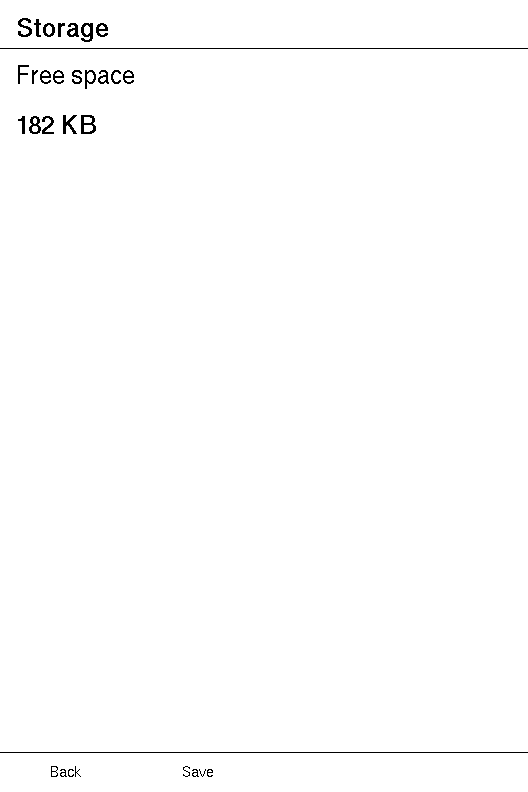
let screen: NavigationScreen<()> = NavigationScreen::new(vstack![20;  Text::new("Free space"),  Text::new("182 KB").bold(),]).title("Storage").hints(Hint::Standard, Hint::text("Save"), Hint::None, Hint::None);
Creating a screen root
Section titled “Creating a screen root”NavigationScreen::new
Section titled “NavigationScreen::new”A page holding content between the header and the button hints.
pub fn new(content: impl View<M> + 'static) -> SelfHeader and hints
Section titled “Header and hints”NavigationScreen::title
Section titled “NavigationScreen::title”Overrides the header title.
pub fn title(self, title: impl Into<String>) -> SelfPrefer the screen's own title, which is already translated. This is for a title
worked out at run time, such as a file name, which Screen::title cannot return
because it must be &'static str.
NavigationScreen::hints
Section titled “NavigationScreen::hints”Sets the four hints, given by meaning rather than by screen position.
pub fn hints(self, back: Hint, confirm: Hint, previous: Hint, next: Hint) -> Self
| Parameter | The slot for |
|---|---|
back | leaving the screen |
confirm | acting on what has focus |
previous | moving back through the content |
next | moving forward through it |
The host puts each slot over the key the user has mapped to it, so a screen never names a position. Blanking three of the four leaves a device without a touch panel showing no sign that its other buttons do anything, which is why the default names all four.
Overlays
Section titled “Overlays”NavigationScreen::overlay
Section titled “NavigationScreen::overlay”A view drawn over the content: a dialog, typically.
pub fn overlay(self, overlay: impl View<M> + 'static) -> SelfThe overlay is measured against the whole panel rather than the content band,
drawn last, and sits outside any ScrollView, so it is neither clipped nor
scrolled away. It is also declared last, which is what lets a dialog that
captures input discard every touch target the content declared.
NavigationScreen::overlay_if
Section titled “NavigationScreen::overlay_if”The overlay, only when when holds.
pub fn overlay_if(self, when: bool, overlay: impl View<M> + 'static) -> SelfSaves a screen an if in body, where both branches would otherwise have to
name the same type.
See also: OverlayPanel, Hint
OverlayPanel
Section titled “OverlayPanel”The root view for a panel that drops over whatever is already on screen.
pub struct OverlayPanel<M>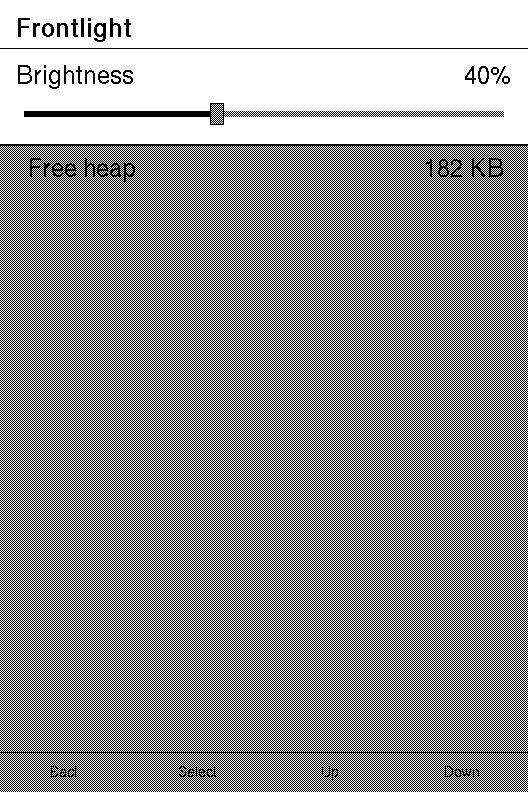
Unlike NavigationScreen, a panel leaves the panel
contents below it intact: the screen it opened over stays visible, and a tap
down there can close it. It sizes itself to its content, paints only its own
band, and rules its bottom edge.
| Builder | Sets | When not called |
|---|---|---|
on_scrim_tap | the message a tap below the panel sends | a tap there does nothing |
scrim | how the screen below is painted | left exactly as it was |
title | the header's text | the screen's own title |
Example — a frontlight drop-down
use xpui::{OverlayPanel, Screen, Scrim, Slider, View, finish_screen};
#[derive(Clone, Copy)]enum Msg { Brightness(i32), Dismiss }
struct Frontlight {  brightness: i32,}
impl Screen for Frontlight {  type Message = Msg;
  fn body(&self) -> impl View<Msg> {    OverlayPanel::new(      Slider::new(self.brightness, 100)        .on_change(Msg::Brightness)        .title("Brightness")        .readout("%"),    )    .scrim(Scrim::Dim)    .on_scrim_tap(Msg::Dismiss)  }
  fn update(&mut self, message: Msg) {    match message {      Msg::Brightness(value) => self.brightness = value.clamp(0, 100),      Msg::Dismiss => finish_screen(),    }  }
  fn is_overlay(&self) -> bool {    true  }
  // Without a title here or on the panel, its header band is empty.  fn title(&self) -> Option<&'static str> {    Some("Frontlight")  }}
Creating a panel
Section titled “Creating a panel”OverlayPanel::new
Section titled “OverlayPanel::new”A panel holding content, dropping down over the screen beneath.
pub fn new(content: impl View<M> + 'static) -> SelfDismissing and dimming
Section titled “Dismissing and dimming”OverlayPanel::on_scrim_tap
Section titled “OverlayPanel::on_scrim_tap”Dismisses on a tap below the panel, where the screen it dropped over is still showing — the drop-down equivalent of a modal scrim.
pub fn on_scrim_tap(self, message: M) -> SelfThe tap is an ordinary interaction, so the screen never compares a touch with the panel's height. The dimming and the tap target come from the same rectangle: the region that looks tappable is the region that is.
OverlayPanel::scrim
Section titled “OverlayPanel::scrim”Dims the screen showing below the panel, so the panel reads as the foreground without its context being repainted or hidden.
pub fn scrim(self, scrim: Scrim) -> Self| Parameter | Meaning |
|---|---|
scrim | Scrim::Dim darkens what is below, leaving about half its pixels so it stays legible. Scrim::None, the default, leaves it as it was. |
Header
Section titled “Header”OverlayPanel::title
Section titled “OverlayPanel::title”Overrides the header title.
pub fn title(self, title: impl Into<String>) -> SelfPrefer the activity's own, already translated, title.
See also: NavigationScreen
One button-hint slot.
pub enum HintWhat a screen puts over one of the four keys. Hint::Standard is the default.
| Variant | |
|---|---|
Hint::Standard | The host's own translated label for this slot. |
Hint::None | Leave the slot blank. |
Hint::Text | A label this screen supplies. |
Hint::Edit | The host's word for opening a value control. |
Hint::Done | The host's word for keeping what a value now reads. |
Hint::Cancel | The host's word for putting a value back. |
A screen writes the first three. The runtime writes Edit, Done and Cancel
while a value control is in play; see
NavigationScreen. They are words rather than strings
because the framework does not know what language its reader uses. The host
answers with its own.
use xpui::Hint;
assert_eq!(Hint::text("Save").label(), Some("Save"));assert_eq!(Hint::None.label(), Some(""));assert_eq!(Hint::Standard.label(), None, "the host's own word, not a string");
Creating a hint
Section titled “Creating a hint”Hint::text
Section titled “Hint::text”A label this screen supplies.
pub fn text(label: impl Into<String>) -> SelfReading a hint
Section titled “Reading a hint”A backend reads a hint through these two; a screen has no need to.
Hint::label
Section titled “Hint::label”What the host should draw: None means "a word of your own", and word says which.
pub fn label(&self) -> Option<&str>Hint::word
Section titled “Hint::word”Which of the host's own words this slot wants, when label says it wants one.
pub fn word(&self) -> HintWordIt crosses the C ABI as an integer beside the label pointer, so a host can switch on it.
HintWord
Section titled “HintWord”Which of a host's own words a hint slot is asking for.
pub enum HintWordThe four standard labels are chosen by the key a slot sits over. These three are
chosen by what the framework is doing, which no key implies. The type is
#[repr(u8)]: the numbers below are what a C host receives.
| Variant | |
|---|---|
HintWord::Standard | Whatever this slot's key is normally called. |
HintWord::Edit | "This control can be opened" — offered over Confirm when the keys are on a value the framework could take over. |
HintWord::Done | "Keep what this now reads" — over Confirm while a value is open. |
HintWord::Cancel | "Leave it as you found it" — over Back while a value is open, where Back would otherwise leave the screen. |
Standard is 0, Edit 1, Done 2 and Cancel 3.
Navigator
Section titled “Navigator”The navigation a screen sits inside.
pub trait Navigator: SyncFor a host, not a screen. App implements it for a Rust binary. A firmware with
its own activity stack implements it across its FFI, and installs it with
host::install_navigator. See who owns the stack.
Required methods
Section titled “Required methods”Navigator::screen_title
Section titled “Navigator::screen_title”This screen's own title, already translated.
fn screen_title(&self) -> &'static str'static on purpose. A navigator that returned a title borrowed from the top
screen would leave it dangling the moment finish dropped that screen. A
translation table on one side and a stored &'static str on the other both
satisfy it.
Navigator::finish
Section titled “Navigator::finish”Pops this screen.
fn finish(&self)Called from inside a screen's own frame. An implementation that owns the stack must record the request and act on it once the frame is over: popping here would free the screen that is running.
Navigator::present
Section titled “Navigator::present”Pushes a screen on top of this one.
fn present(&self, screen: Box<dyn Driver>) -> Option<Box<dyn Driver>>Returns None when the navigator took the screen, and Some(screen), handing
it back, when it cannot. A stack outside Rust can take one: the screen crosses
as an opaque handle the host only ever hands back. The same rule as finish
applies: record the request, and act after the frame.