

Screens
A screen is a struct holding its own state, with a body describing what it
looks like and an update that is the only place that state changes. The
runtime drives one screen at a time, and App keeps a stack of them for a host
with no navigation of its own; both are in app.
How a frame runs follows one frame from input to paint. The tutorial builds a screen from nothing. This page is what each piece does.
Topics
Section titled “Topics”Screen | A page of the interface: its state, what it looks like, and how a message changes it. |
Screen
Section titled “Screen”A page of the interface: its state, what it looks like, and how a message changes it.
pub trait ScreenA screen writes two methods and a message type, and overrides the rest when it
needs them. Everything it is offered arrives through these methods, and it never
reads a touch, tracks focus or asks for a repaint after update.
| Method | Default | What it is for |
|---|---|---|
body | — | Describes the screen. Called once per paint and once per frame carrying input. |
update | — | Applies a message. The runtime repaints afterwards. |
title | None | The screen's name, for the header and for a host that keeps a stack. |
on_key | None | Any key, and the back gesture as Back, offered before the runtime applies its own meaning. |
on_swipe | None | A swipe, likewise offered first. |
on_background_tap | None | A touch no control claimed. |
tick | nothing | A frame happened, whether or not any input arrived. |
is_overlay | false | Whether this screen paints over what is already on the panel instead of clearing it. |
on_enter · on_exit | nothing | Pushed and popped, for work that does not belong in body. |
handle_home_gesture | false | Return true to consume the system home gesture. |
Message must be Clone: a widget carries values of it and the runtime hands
them back, sometimes more than once in a frame.
Keep work out of body. It is rebuilt on every paint and on every frame of
a drag, so anything expensive belongs in update, where it happens once per
event. Formatting is the usual offender: a format! in body allocates several
times a second, where the same format! in update allocates once per change.
Your own screens implement it. screen::Runtime drives one,
and App keeps a stack of them.
Example — the minimal screen
use xpui::{NavigationScreen, Screen, Stepper, Text, View, vstack};
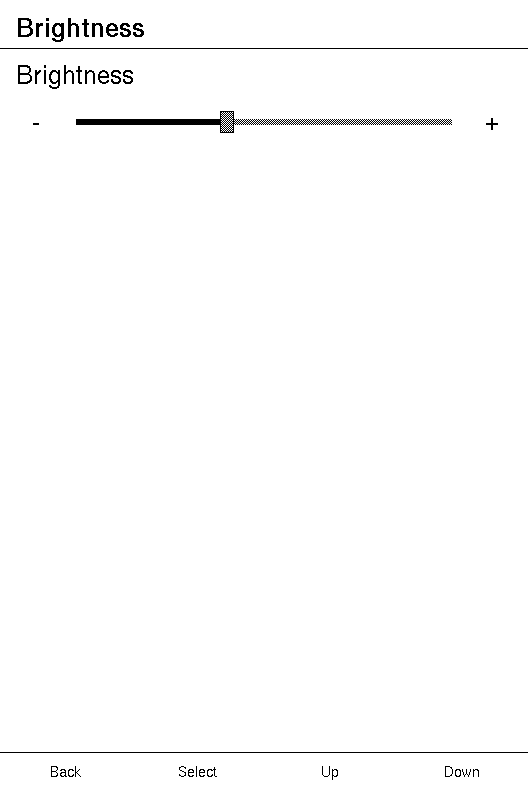
#[derive(Clone, Copy)]enum Msg {  Set(i32),  // an absolute value, from dragging the track  Step(i32), // a nudge of -1 or +1, from the end glyphs}
struct Brightness {  level: i32,}
impl Screen for Brightness {  type Message = Msg;
  fn body(&self) -> impl View<Msg> {    NavigationScreen::new(vstack![12;      Text::new("Brightness"),      Stepper::new(self.level).on_change(Msg::Set).on_step(Msg::Step),    ])  }
  fn update(&mut self, message: Msg) {    match message {      Msg::Set(level) => self.level = level.clamp(0, 100),      Msg::Step(delta) => self.level = (self.level + delta).clamp(0, 100),    }  }
  fn title(&self) -> Option<&'static str> {    Some("Brightness")  }}
// `update` is an ordinary method, so a screen is testable with no UI at all.let mut screen = Brightness { level: 40 };screen.update(Msg::Step(-1));assert_eq!(screen.level, 39);
Example — a timeout in tick
use xpui::{App, Screen, Text, View, millis, request_update, testing};
const IDLE_MS: u32 = 30_000;
struct Reader {  last_touched: u32,  dimmed: bool,}
impl Screen for Reader {  type Message = ();
  fn tick(&mut self) {    // Nothing ever arrives to say a screen has been left alone.    if !self.dimmed && millis().wrapping_sub(self.last_touched) > IDLE_MS {      self.dimmed = true;      request_update();    }  }
  fn body(&self) -> impl View<()> {    Text::new(if self.dimmed { "Dimmed" } else { "Chapter 1" })  }
  fn update(&mut self, _message: ()) {}}
testing::install();let mut app = App::new(Reader { last_touched: 0, dimmed: false });app.render();
testing::set_millis(31_000);app.tick(); // no input arrived, and `tick` ran anywayassert!(app.is_dirty(), "the screen asked for a repaint");
Example — claiming keys and swipes
use xpui::{App, Button, Screen, SwipeDir, Text, View, testing};
#[derive(Clone, Copy)]enum Msg {  Turn(i32),}
struct Book {  page: i32,}
impl Screen for Book {  type Message = Msg;
  fn body(&self) -> impl View<Msg> {    Text::new("It was a dark and stormy night.")  }
  fn update(&mut self, message: Msg) {    match message {      Msg::Turn(by) => self.page = (self.page + by).max(0),    }  }
  fn on_key(&self, key: Button) -> Option<Msg> {    match key {      Button::PageForward | Button::Right => Some(Msg::Turn(1)),      Button::PageBack | Button::Left => Some(Msg::Turn(-1)),      _ => None, // everything else keeps the runtime's meaning    }  }
  fn on_swipe(&self, direction: SwipeDir) -> Option<Msg> {    match direction {      SwipeDir::Left => Some(Msg::Turn(1)),      SwipeDir::Right => Some(Msg::Turn(-1)),      _ => None,    }  }}
let book = Book { page: 0 };assert!(matches!(book.on_key(Button::PageForward), Some(Msg::Turn(1))));assert!(book.on_swipe(SwipeDir::Up).is_none());
// Back was not claimed, so it still leaves the book.testing::install();let mut app = App::new(book);testing::press(Button::Back);app.tick();assert!(!app.is_running());
Example — closing on a tap outside
use xpui::{Point, Screen, Text, View, finish_screen};
#[derive(Clone, Copy)]enum Msg {  Dismiss,}
struct Saved;
impl Screen for Saved {  type Message = Msg;
  fn body(&self) -> impl View<Msg> {    Text::new("Saved")  }
  fn update(&mut self, message: Msg) {    match message {      Msg::Dismiss => finish_screen(),    }  }
  // Anywhere the text is not.  fn on_background_tap(&self, _point: Point) -> Option<Msg> {    Some(Msg::Dismiss)  }
  fn is_overlay(&self) -> bool {    true  }}
assert!(Saved.on_background_tap(Point::new(10, 700)).is_some());
Example — on_enter and on_exit
use core::sync::atomic::{AtomicBool, Ordering};use xpui::{App, Button, Screen, Text, View, testing};
static SCANNING: AtomicBool = AtomicBool::new(false);
struct Home;
impl Screen for Home {  type Message = ();  fn body(&self) -> impl View<()> {    Text::new("Home")  }  fn update(&mut self, _message: ()) {}}
struct Networks;
impl Screen for Networks {  type Message = ();
  fn body(&self) -> impl View<()> {    Text::new("Scanning")  }
  fn update(&mut self, _message: ()) {}
  fn on_enter(&mut self) {    SCANNING.store(true, Ordering::Relaxed); // start the radio  }
  fn on_exit(&mut self) {    SCANNING.store(false, Ordering::Relaxed); // and stop it  }}
testing::install();let mut app = App::new(Home);app.push(Networks);assert!(SCANNING.load(Ordering::Relaxed));
testing::press(Button::Back);app.tick();assert!(!SCANNING.load(Ordering::Relaxed));assert_eq!(app.depth(), 1);
Example — an overlay
use xpui::{App, NavigationScreen, OverlayPanel, Screen, Text, View, testing, vstack};
struct Library;
impl Screen for Library {  type Message = ();  fn body(&self) -> impl View<()> {    NavigationScreen::new(vstack![12; Text::new("Dune"), Text::new("Emma"), Text::new("Ivanhoe")])  }  fn update(&mut self, _message: ()) {}  fn title(&self) -> Option<&'static str> {    Some("Library")  }}
struct Sort;
impl Screen for Sort {  type Message = ();  fn body(&self) -> impl View<()> {    OverlayPanel::new(vstack![0; Text::new("By title")])  }  fn update(&mut self, _message: ()) {}  fn is_overlay(&self) -> bool {    true  }  fn title(&self) -> Option<&'static str> {    Some("Sort")  }}
testing::install();testing::reset();let mut app = App::new(Library);app.push(Sort);app.render();
// The library was painted first, then the panel over it.let drawn: Vec<String> = testing::drawn_text().into_iter().map(|(_, _, text, _, _)| text).collect();assert_eq!(drawn, ["Dune", "Emma", "Ivanhoe", "By title"]);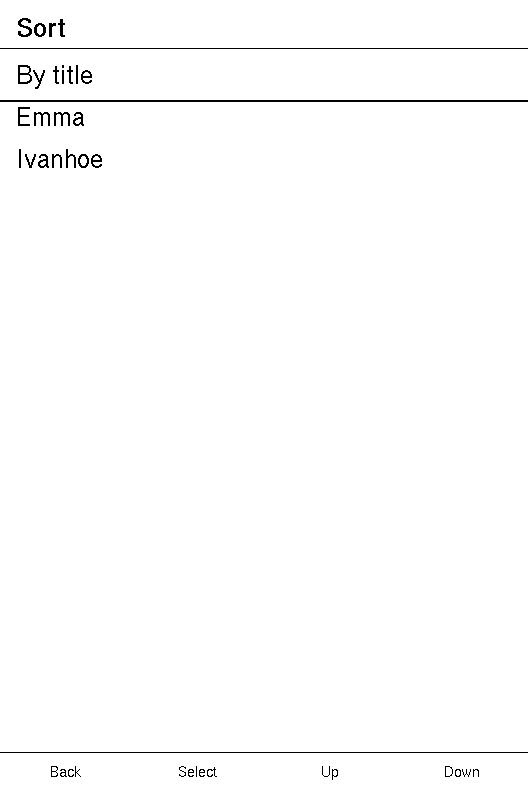
Example — dismissing an overlay with the home gesture
App::tick does this on its own when the host reports the gesture. The fake
host reports none, so this calls App::home_gesture, as a host with a home key
of its own would.
use xpui::{App, Screen, Text, View, finish_screen, testing};
struct Page(&'static str);
impl Screen for Page {  type Message = ();  fn body(&self) -> impl View<()> {    Text::new(self.0)  }  fn update(&mut self, _message: ()) {}}
struct Frontlight;
impl Screen for Frontlight {  type Message = ();  fn body(&self) -> impl View<()> {    Text::new("Frontlight")  }  fn update(&mut self, _message: ()) {}  fn is_overlay(&self) -> bool {    true  }  fn handle_home_gesture(&mut self) -> bool {    finish_screen();    true  }}
testing::install();let mut app = App::new(Page("Home"));app.push(Page("Settings"));app.push(Frontlight);
app.home_gesture(); // the drop-down claims it...app.tick(); // ...and its finish lands at the end of the next frameassert_eq!(app.depth(), 2, "Settings is still there");
app.home_gesture(); // nothing claims it nowassert_eq!(app.depth(), 1, "back at Home");
Required methods
Section titled “Required methods”Screen::Message
Section titled “Screen::Message”What this screen's controls send back.
type Message: CloneOne enum per screen, matched exhaustively in update. A variant that carries a
value is written as its constructor, Msg::Set, which a control calls with the
value it resolved. Carry the state being moved to rather than an instruction to
flip, so a message applied twice does no harm.
Screen::body
Section titled “Screen::body”Describes the screen.
fn body(&self) -> impl View<Self::Message>A pure function of self: no device writes, no state changes. The tree it
returns is measured, walked and dropped, and the next frame builds another, so
there is no stored tree to disagree with the screen's fields. Return a
NavigationScreen for an ordinary page, or
an OverlayPanel from an overlay.
Screen::update
Section titled “Screen::update”Applies a message.
fn update(&mut self, message: Self::Message)The only place state changes. The runtime asks for a repaint after every call,
so no screen calls request_update here. This is also where a screen asks for
navigation, with present and
finish_screen.
Provided methods
Section titled “Provided methods”Screen::on_key
Section titled “Screen::on_key”A key, offered to the screen before the runtime applies its own meaning.
fn on_key(&self, key: Button) -> Option<Self::Message>Return a message to consume the key, or None to leave it to the runtime:
Up and Down move focus, Confirm sends the focused control's message, Left and
Right nudge a value, and Back closes an open dialog or finishes the screen.
Every Button is offered, Power, NavNext, NavPrevious and the four
Screen* directions included, though the runtime gives those no meaning of its
own. The system back gesture arrives here as Button::Back. A key claimed here
repeats while it is held, 500 ms after the press and every 500 ms after that.
It is offered first even while a value is open for editing or a dialog is up,
so a screen claiming Up takes it away from the edit, and a screen claiming Back
keeps it from the dialog.
Screen::on_swipe
Section titled “Screen::on_swipe”A swipe, offered to the screen before the runtime gives it its own meaning.
fn on_swipe(&self, _direction: SwipeDir) -> Option<Self::Message>Unclaimed, an up or down swipe moves focus, in whichever direction the host's
swipe_moves_selection chooses, and a left or right one does nothing. No swipe
is offered before the screen's first paint, or while a value is open.
Screen::on_background_tap
Section titled “Screen::on_background_tap”A touch that no control claimed.
fn on_background_tap(&self, point: Point) -> Option<Self::Message>| Parameter | Meaning |
|---|---|
point | Where the tap landed, in panel coordinates. |
Asked only when no control declared at point takes the tap, only on a host
with a touch panel, and never before the screen's first paint or while a value
is open. Under a dialog given Modal::on_dismiss, the dialog takes a tap
outside its options and this is not asked; under one without, it is. An
OverlayPanel gets the same effect with on_scrim_tap, which is an ordinary
interaction and needs no coordinates.
Screen::is_overlay
Section titled “Screen::is_overlay”Whether this screen paints over what is already on the panel, leaving it visible beneath.
fn is_overlay(&self) -> boolAn overlay's frame does not clear the panel. App::render paints
the screens beneath it first, down to the first one that is not an overlay, so
there is something to paint over. The screen below is painted, not run: it
receives no input and does not tick.
Screen::title
Section titled “Screen::title”This screen's title, for a host that keeps a stack of them.
fn title(&self) -> Option<&'static str>It is what a NavigationScreen with no title of its own draws in the header.
'static because a host may hold it past this frame. A title worked out at run
time, such as a file name, goes to NavigationScreen::title inside body
instead. An OverlayPanel usually wants None.
Screen::tick
Section titled “Screen::tick”A frame happened.
fn tick(&mut self)Called once per frame on the screen on top, before any input is considered, and on frames where none arrived. Every other method fires because something arrived; this one fires because nothing did, so it is where a countdown, a timeout or an auto-refresh notices a deadline has passed. A screen further down the stack does not tick.
It takes no argument on purpose. A screen that wants the time asks
millis() and compares. The runtime does not assume a tick changed anything,
so a screen that changes what it shows calls request_update.
Screen::on_enter
Section titled “Screen::on_enter”The screen was pushed, before its first frame.
fn on_enter(&mut self)A screen uncovered by a pop is not told. Calling present from here is
allowed, and lands at the end of the next frame.
Screen::on_exit
Section titled “Screen::on_exit”The screen is being popped.
fn on_exit(&mut self)A screen covered by a push is not told. It is called before the screen is dropped, while the stack still holds the screens below it.
Screen::handle_home_gesture
Section titled “Screen::handle_home_gesture”The system home gesture, offered to the screen on top.
fn handle_home_gesture(&mut self) -> boolReturn true to consume it, and App does nothing more. Return false, the
default, and App pops every screen down to the root. An overlay claims it and
calls finish_screen, so the gesture closes the overlay and nothing else.
App::tick reads the gesture from the host's input and offers it here, so no
screen and no host reads it; a host with another way home calls
App::home_gesture.
See also: App, NavigationScreen, present