

Dialogs
A dialog asks one question over the screen that raised it: a value to choose, an action to take, a yes or a no. The host's theme draws it, so it looks like the device's own dialogs, and while it is up it has the keys and the touch panel to itself.
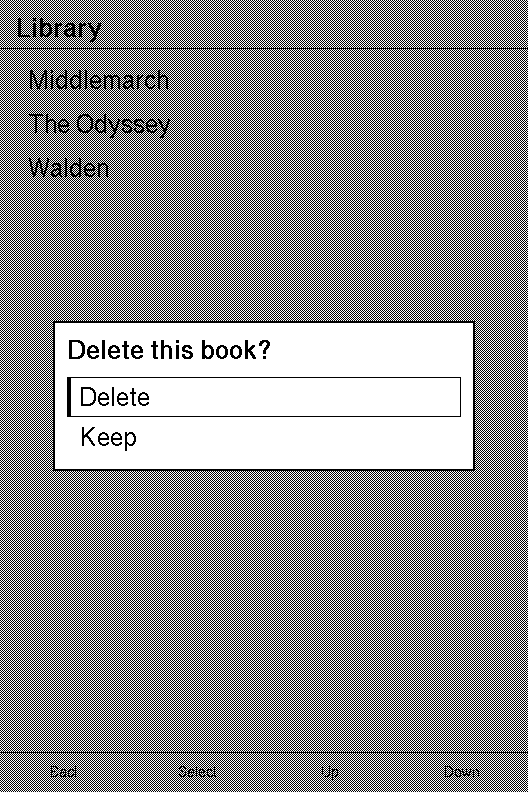
A second screen builds the list a dialog is usually opened from. This page is what the dialog does, and what it does to the screen behind it.
Topics
Section titled “Topics”Modal | A centred dialog offering a list of options, drawn by the host's theme so it matches the host's own dialogs. |
Scrim | How a view treats whatever is already on the panel behind it. |
A centred dialog offering a list of options, drawn by the host's theme so it matches the host's own dialogs.
pub struct Modal<M>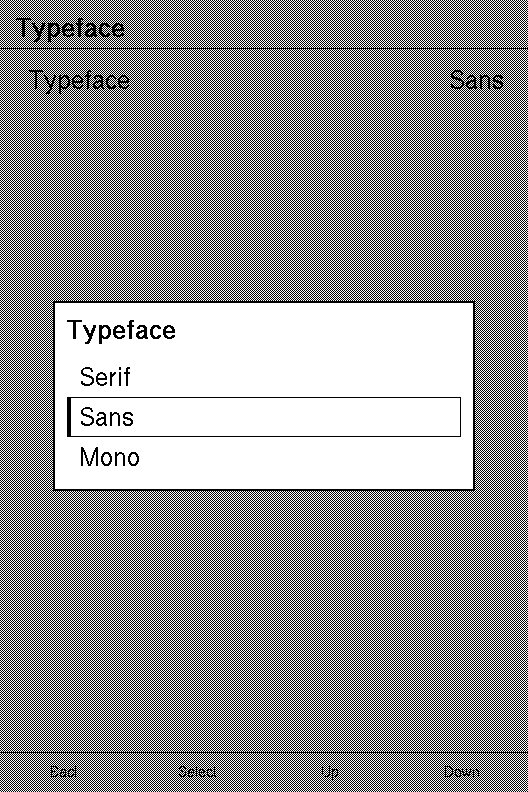
M is the screen's message type: what choosing an option sends.
| Builder | Sets | When not called |
|---|---|---|
new · picker · confirm | the title and the options | — |
selected | the option highlighted, and where focus opens | the first option |
on_select | the message a choice sends, which makes the options reachable | nothing is sent, and the dialog still captures input |
on_dismiss | the message Back and a tap outside the options send | Back does nothing while the dialog is open, and a tap outside goes to Screen::on_background_tap |
scrim | how the panel behind the dialog is painted | Scrim::None: left as it was |
A dialog captures input. While one is in the tree, nothing declared before
it can be reached, by touch or by key. Focus opens on the
selected option. Every key and swipe that walks a list walks
the dialog's options instead, and Confirm, or a tap on an option, sends that
option's message. On the first frame without the dialog, focus goes back to
where it was before the dialog opened: the row that opened it.
The screen owns whether it is open. A dialog never closes itself. Hold a
flag in the screen's state, put the dialog in body while the flag is set, and
clear it in update when the answer arrives.
NavigationScreen::overlay_if is
the place for it.
It is declared last. Capturing discards what was declared before the dialog,
and a tree is declared in the order it draws, so the content must come first.
An overlay on a NavigationScreen is declared
after the content, whatever the content holds.
It takes the whole panel. It measures as the full size it is offered, and the theme centres the dialog and sizes it to its title and options. It draws over what is already on the panel without clearing it. An empty dialog draws nothing and captures nothing.
Back belongs to the dialog. While a dialog is open, a Back the screen does
not claim never finishes the screen. It sends the dialog's
on_dismiss message or, when the dialog has none, does
nothing at all. The system back gesture is the same Back. Screen::on_key is
still asked first, so a screen that claims Back keeps it.
So does a tap outside its options. A tap that lands on no option, on the
dimmed panel or on the dialog's own title, sends on_dismiss, and
Screen::on_background_tap is not asked. A dialog without on_dismiss leaves
that tap to on_background_tap, as it always did.
Example — a typeface picker
A settings row opens it. Focus opens on the face already chosen, a choice or a tap outside closes it, and Back closes it rather than leaving the screen.
use xpui::{App, Button, List, ListRow, Modal, NavigationScreen, Screen, Scrim, View, testing};
const FONTS: [&str; 3] = ["Serif", "Sans", "Mono"];
#[derive(Clone, Copy)]enum Msg {  Open,  Chose(usize),  Dismiss,}
struct Typeface {  chosen: usize,  picking: bool,}
impl Screen for Typeface {  type Message = Msg;
  fn body(&self) -> impl View<Msg> {    NavigationScreen::new(      List::new().push(        ListRow::new("Typeface")          .value(FONTS[self.chosen])          .on_tap(Msg::Open),      ),    )    .overlay_if(      self.picking,      Modal::picker("Typeface", FONTS)        .selected(self.chosen) // focus opens on the current face        .on_select(Msg::Chose)        .on_dismiss(Msg::Dismiss) // Back, or a tap outside the options        .scrim(Scrim::Dim),    )  }
  fn update(&mut self, message: Msg) {    match message {      Msg::Open => self.picking = true,      Msg::Chose(index) => {        self.chosen = index.min(FONTS.len() - 1);        self.picking = false;      }      Msg::Dismiss => self.picking = false,    }  }
  fn title(&self) -> Option<&'static str> {    Some("Typeface")  }}
let mut screen = Typeface { chosen: 0, picking: false };screen.update(Msg::Open);screen.update(Msg::Chose(1));assert_eq!((screen.chosen, screen.picking), (1, false));
// Driven: Back closes the open picker, and the screen stays.testing::install();testing::reset();let mut app = App::new(Typeface { chosen: 0, picking: true });app.render();testing::press(Button::Back);app.tick();testing::reset();app.render();assert!(app.is_running());assert!(testing::drawn_popups().is_empty(), "the dialog is gone");
Example — what capturing does
The runtime collects every region a frame declares. A dialog clears what came before it and asks for focus on its selected option.
use xpui::{InputMask, Interactions, Modal, Point, Rect, Renderer, Trigger, View};
#[derive(Clone, Copy)]enum Msg {  Row,  Chose(usize),}
let mut out = Interactions::new(0);// A row behind the dialog, declared first, as content always is.out.declare(Rect::new(0, 0, 200, 40), InputMask::DEFAULT, Trigger::Message(Msg::Row));
let mut dialog = Modal::picker("Typeface", ["Serif", "Sans", "Mono"])  .selected(1)  .on_select(Msg::Chose);dialog.measure(Renderer::screen_size());dialog.interactions(Point::ORIGIN, &mut out);
assert_eq!(out.focusable_count(), 3, "the three options, and not the row behind");assert_eq!(out.captured_focus(), Some(1), "focus opens on Sans");
Creating a dialog
Section titled “Creating a dialog”The three constructors build the same dialog. Choose the one that says what the dialog is for.
Modal::new
Section titled “Modal::new”A dialog titled title offering options, the first selected.
pub fn new<S: Into<String>>(title: impl Into<String>, options: impl IntoIterator<Item = S>) -> Self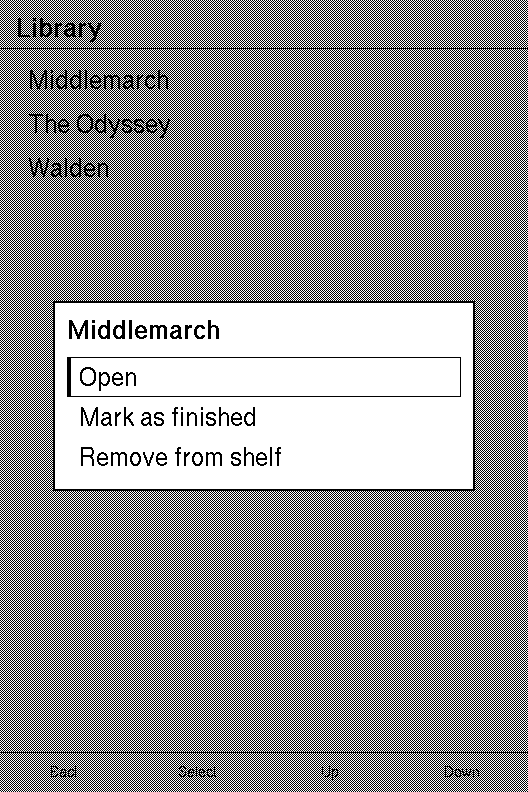
| Parameter | Meaning |
|---|---|
title | The heading the theme draws above the options. |
options | The options, top to bottom: an array of &str, a Vec<String>, anything whose items convert to String. Converted once, when the dialog is built. |
For a dialog that is neither a value to pick nor a yes or a no: a menu of actions on one thing.
Example — an action menu
use xpui::{Modal, Scrim};
#[derive(Clone, Copy)]enum Msg {  Action(usize), // 0 Open, 1 Mark as finished, 2 Remove from shelf}
const ACTIONS: [&str; 3] = ["Open", "Mark as finished", "Remove from shelf"];
let menu: Modal<Msg> = Modal::new("Middlemarch", ACTIONS)  .on_select(Msg::Action)  .scrim(Scrim::Dim);assert_eq!(menu.len(), 3);
Example — options that are only known at run time
use xpui::Modal;
let networks: Vec<String> = ["Home", "Office"].iter().map(|name| format!("{name} (5 GHz)")).collect();let dialog: Modal<usize> = Modal::new("Wi-Fi", networks).on_select(|index| index);assert_eq!(dialog.len(), 2);
Modal::picker
Section titled “Modal::picker”A dialog for choosing one value from several, the same dialog as new under a name that reads better at a settings row.
pub fn picker<S: Into<String>>(title: impl Into<String>, options: impl IntoIterator<Item = S>) -> SelfGive it the value the row shows as selected, so focus opens
on it. See the typeface picker above.
Modal::confirm
Section titled “Modal::confirm”A yes/no question, opening with focus on the first of choices, so the confirming one goes first.
pub fn confirm<S: Into<String>>(title: impl Into<String>, choices: impl IntoIterator<Item = S>) -> SelfThe dialog does not know which choice confirms: it reports an index, and the
order is the caller's. Where the question is destructive and the safe answer
should hold focus, put the confirming choice first anyway and open on the other
with .selected(1).
Example — "Delete this book?"
The picture at the top of this page is this screen, asking about its second book.
use xpui::{List, ListRow, Modal, NavigationScreen, Screen, Scrim, View};
#[derive(Clone, Copy)]enum Msg {  Ask(usize),  Answer(usize), // 0 Delete, 1 Keep}
struct Library {  books: Vec<&'static str>,  deleting: Option<usize>,}
impl Screen for Library {  type Message = Msg;
  fn body(&self) -> impl View<Msg> {    let rows = self      .books      .iter()      .enumerate()      .map(|(index, title)| ListRow::new(*title).on_tap(Msg::Ask(index)));    NavigationScreen::new(List::new().extend(rows)).overlay_if(      self.deleting.is_some(),      Modal::confirm("Delete this book?", ["Delete", "Keep"])        .on_select(Msg::Answer)        .scrim(Scrim::Dim),    )  }
  fn update(&mut self, message: Msg) {    match message {      Msg::Ask(index) => self.deleting = Some(index),      Msg::Answer(0) => {        if let Some(index) = self.deleting.take() {          self.books.remove(index);        }      }      Msg::Answer(_) => self.deleting = None,    }  }
  fn title(&self) -> Option<&'static str> {    Some("Library")  }}
let mut library = Library {  books: vec!["Middlemarch", "The Odyssey", "Walden"],  deleting: None,};library.update(Msg::Ask(1));library.update(Msg::Answer(0));assert_eq!(library.books, ["Middlemarch", "Walden"]);assert!(library.deleting.is_none(), "answering closes the dialog");
Choosing
Section titled “Choosing”Modal::selected
Section titled “Modal::selected”The option to highlight, and where focus opens.
pub fn selected(self, index: usize) -> Self| Parameter | Meaning |
|---|---|
index | Zero-based, in the order the options were given. Past the last option, focus opens on the last. |
It is read when the dialog appears. From then on the highlight follows focus as
the keys walk the options, and the screen hears nothing until one is chosen.
Without on_select no option can take focus, so this only
highlights.
Modal::on_select
Section titled “Modal::on_select”Sends make(index) when an option is chosen, by touch or by Confirm.
pub fn on_select(self, make: fn(usize) -> M) -> Self| Parameter | Meaning |
|---|---|
make | Turns the chosen option's zero-based index into a message. Usually a variant constructor: Msg::Chose. |
A function pointer, not a closure, so it captures nothing: the index is all it
is given. Choosing does not close the dialog; update does, by clearing the
flag that put it in body.
Dismissing
Section titled “Dismissing”Modal::on_dismiss
Section titled “Modal::on_dismiss”Sends message when the dialog is dismissed without a choice: by a Back the screen does not claim, or by a tap on none of its options.
pub fn on_dismiss(self, message: M) -> Self| Parameter | Meaning |
|---|---|
message | What the screen is sent. Usually a variant with no payload, Msg::Dismiss, cloned each time it is sent. |
Without it, Back does nothing while the dialog is open, and a tap outside the
options goes to Screen::on_background_tap. Either way the screen is never
finished from under an open dialog. Like a choice, the message does not close
the dialog: update does, by clearing the flag that put it in body. An empty
dialog captures nothing, so there is nothing to dismiss and Back leaves the
screen as usual.
Example — Back closes the question, then the screen
use xpui::{App, Button, Modal, NavigationScreen, Screen, Text, View, testing, vstack};
#[derive(Clone, Copy)]enum Msg {  Answer(usize),  Dismiss,}
struct Book {  asking: bool,}
impl Screen for Book {  type Message = Msg;
  fn body(&self) -> impl View<Msg> {    NavigationScreen::new(vstack![0; Text::new("Walden")]).overlay_if(      self.asking,      Modal::confirm("Delete this book?", ["Delete", "Keep"])        .on_select(Msg::Answer)        .on_dismiss(Msg::Dismiss),    )  }
  fn update(&mut self, message: Msg) {    match message {      Msg::Answer(_) | Msg::Dismiss => self.asking = false,    }  }
  fn title(&self) -> Option<&'static str> {    Some("Walden")  }}
testing::install();testing::reset();let mut app = App::new(Book { asking: true });app.render();
testing::press(Button::Back); // the dialog is open: Back dismisses itapp.tick();assert!(app.is_running(), "the screen is still here");
testing::press(Button::Back); // nothing is open now, so Back leavesapp.tick();assert!(!app.is_running());
Dimming
Section titled “Dimming”Modal::scrim
Section titled “Modal::scrim”Sets how the whole panel behind the dialog is painted, left as it was (Scrim::None) unless this is called.
pub fn scrim(self, scrim: Scrim) -> Self| Parameter | Meaning |
|---|---|
scrim | Scrim::Dim darkens the whole panel, header and hints included, before the dialog is drawn. Scrim::None leaves it as it was. |
See Scrim for what dimming does to the pixels, with a picture of
each.
Reading a dialog
Section titled “Reading a dialog”Modal::len
Section titled “Modal::len”How many options it offers.
pub fn len(&self) -> usizeModal::is_empty
Section titled “Modal::is_empty”Whether it offers no options.
pub fn is_empty(&self) -> boolAn empty dialog draws nothing and captures nothing, so it cannot trap input in something the reader cannot see.
See also: Scrim, NavigationScreen::overlay, ListRow
How a view treats whatever is already on the panel behind it.
pub enum Scrim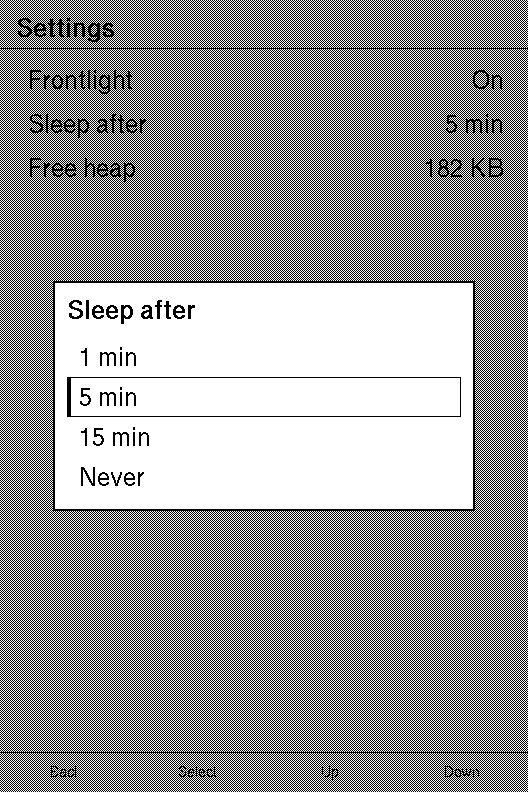
Anything that paints over a screen takes one: a dialog, through
Modal::scrim, and a drop-down, through
OverlayPanel::scrim. Scrim::None is the
default.
| Variant | |
|---|---|
Scrim::None | Left exactly as it was. |
Scrim::Dim | Darkened, so the panel reads as the foreground. |
Dimming adds ink and clears nothing. A 1-bit panel has no grey, so the host sets ink on one parity of a checkerboard over the region and leaves the other parity alone. About half the pixels behind survive, the region reads as grey, and the screen behind stays legible. A dither cannot do this: it clears the region before applying its pattern, which destroys the very content an overlay exists to keep in view.
A dialog dims the whole panel. A drop-down dims only the part of the screen below its own band, which is also the part a tap can close it from.
Dimming says the screen behind is out of reach, which is true of every dialog. Leave it undimmed when the reader wants to compare the choice with what is behind it, such as a font size chosen over the page it changes.
Example — a dimmed dialog
use xpui::{List, ListRow, Modal, NavigationScreen, Scrim};
#[derive(Clone, Copy)]enum Msg {  Frontlight,  Sleep,  SleepAfter(usize),}
const DELAYS: [&str; 4] = ["1 min", "5 min", "15 min", "Never"];
let screen: NavigationScreen<Msg> = NavigationScreen::new(  List::new()    .push(ListRow::new("Frontlight").value("On").on_tap(Msg::Frontlight))    .push(ListRow::new("Sleep after").value(DELAYS[1]).on_tap(Msg::Sleep))    .push(ListRow::new("Free heap").value("182 KB")),).overlay(  Modal::picker("Sleep after", DELAYS)    .selected(1)    .on_select(Msg::SleepAfter)    .scrim(Scrim::Dim),);
Example — the same dialog, undimmed
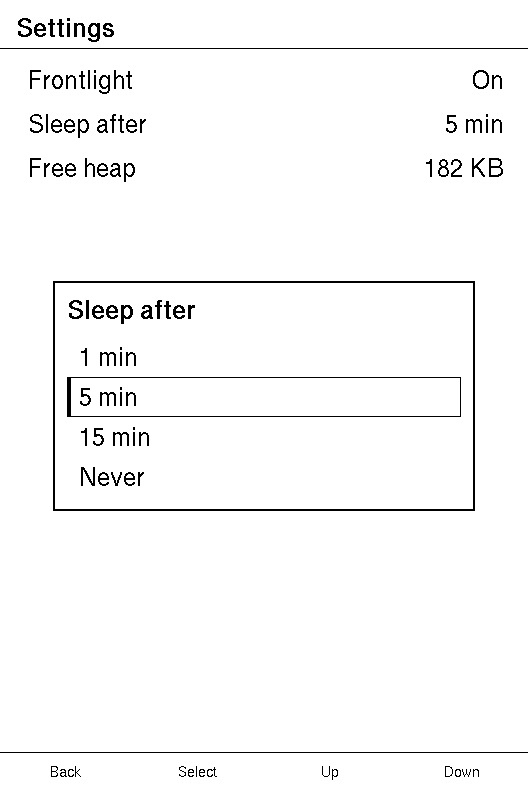
let screen: NavigationScreen<Msg> = NavigationScreen::new( List::new() .push(ListRow::new("Frontlight").value("On").on_tap(Msg::Frontlight)) .push(ListRow::new("Sleep after").value(DELAYS[1]).on_tap(Msg::Sleep)) .push(ListRow::new("Free heap").value("182 KB")),).overlay( Modal::picker("Sleep after", DELAYS) .selected(1) .on_select(Msg::SleepAfter) .scrim(Scrim::None), // the default: the same as not calling `scrim`);use xpui::Scrim;
assert_eq!(Scrim::default(), Scrim::None);See also: Modal::scrim, OverlayPanel::scrim