

Panel and body
The panel a window shows, the display the firmware draws on, and the device body drawn round it from the board's millimetres. The panel is the anchor: it takes exactly its own pixels times the scale, and the body is drawn at whatever ratio that gives, so zoom moves nothing on the device.
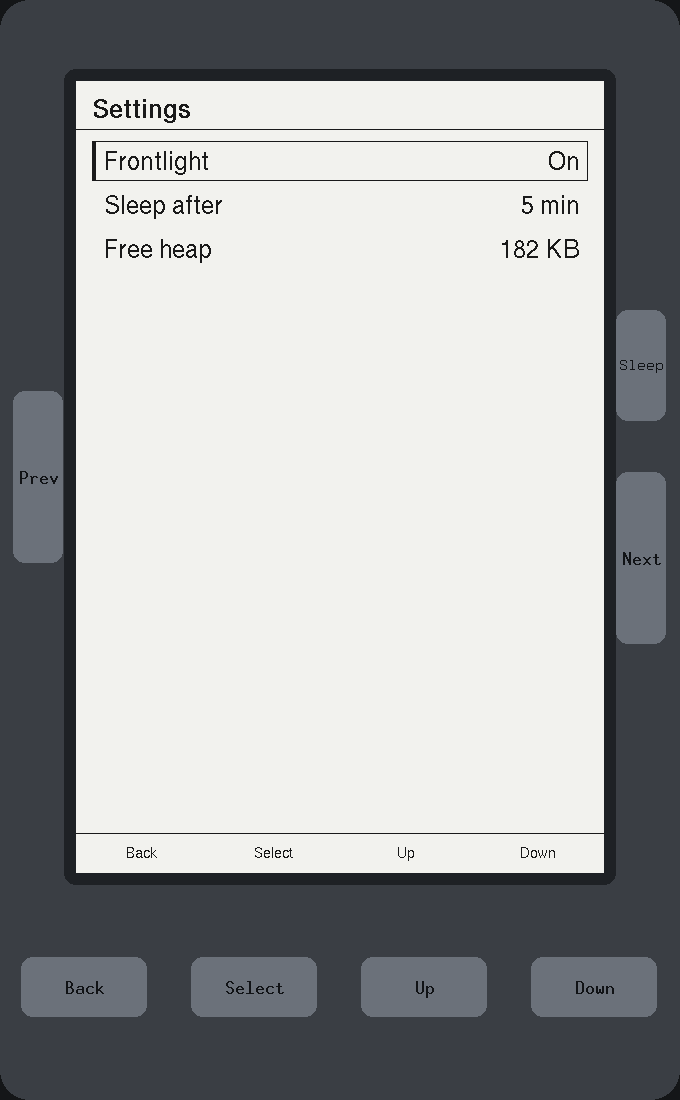
Boards and The device around the panel are the guide. This page is what each piece does.
Topics
Section titled “Topics”Panel | The panel to simulate. |
PanelDisplay | The panel display, which is the only thing the firmware can draw on. |
BezelLayout | A device's body, its panel and its buttons, in window pixels. |
paint_body | Repaints the whole body, with held — if any — pressed in. |
Board | Re-exported from xpui-boards-core. |
The panel to simulate.
pub struct Panel| Field | |
|---|---|
Panel::width | The panel's width in its own pixels. |
Panel::height | The panel's height in its own pixels. |
Panel::scale | How many window pixels one panel pixel occupies. |
Panel::board | The device being simulated, passed to the backend whole. |
The board is carried whole rather than rebuilt from the width and height,
because a rebuilt one loses its name, its refresh time, its keys and whether it
has a touchscreen. It is the same Board a firmware reads, so a screen laid out
in the window and on the device is laid out against the same numbers.
Scale is a window concern. The panel is the same number of pixels at 1× as at 3×, and nothing a screen measures changes with it.
Example — a panel of your own
use xpui_simulator::{Board, Panel};
let reader = Panel::of(Board::custom("my reader", 480, 800, false));assert_eq!((reader.width, reader.height), (480, 800));assert_eq!(reader.scale, 1, "a reader-sized panel fits at life size");assert_eq!(reader.window_size(), (480, 800), "no body, so the window is the panel");
let strip = Panel::of(Board::custom("my badge", 296, 128, false));assert_eq!(strip.scale, 3, "a small strip is tripled");assert_eq!(strip.scaled(2).size_in_window(), (592, 256));
Creating a panel
Section titled “Creating a panel”Panel::of
Section titled “Panel::of”The panel a Board has.
pub const fn of(board: Board) -> PanelAt the scale scale_for picks.
Panel::scaled
Section titled “Panel::scaled”The same panel at scale window pixels per panel pixel.
pub fn scaled(self, scale: u32) -> SelfA session's window is sized to fit it, so a large scale widens the whole
window. A Session opens anything above six at six, the
furthest zoom goes, and zero at one.
Sizing the window
Section titled “Sizing the window”Panel::scale_for
Section titled “Panel::scale_for”The largest whole scale whose window still fits a modest display.
pub const fn scale_for(board: Board) -> u32At most 3, and the largest whose window, body included, fits 1200 × 900 on both axes; never below 1. The budget is small on purpose: a window that opens larger than the display cannot be dragged back onto it on every desktop.
Panel::window_for
Section titled “Panel::window_for”The whole window board would open at scale.
pub const fn window_for(board: Board, scale: u32) -> (i32, i32)Panel::window_size
Section titled “Panel::window_size”The window this panel opens: the whole body when the board has one, and the panel itself when it has not.
pub const fn window_size(&self) -> (i32, i32)Panel::size_in_window
Section titled “Panel::size_in_window”The panel's own size in window pixels, before any body is drawn round it.
pub const fn size_in_window(&self) -> (i32, i32)See also: Session, BezelLayout
PanelDisplay
Section titled “PanelDisplay”The panel display, which is the only thing the firmware can draw on.
pub type PanelDisplay = SimulatorDisplay<BinaryColor>One bit per pixel, like the panels. BinaryColor::On is ink: the backend is
built with Palette::INK_IS_ON, window_settings
draws On dark, and capture_panel reads On as
ink. Everything outside it, the body and the letterbox, is drawn on a separate
colour display the firmware cannot reach.
BezelLayout
Section titled “BezelLayout”A device's body, its panel and its buttons, in window pixels.
pub struct BezelLayoutA board's Bezel is in tenths of a millimetre; the window is in pixels. Every
conversion between the two is here, so the painter, the click routing and a
test all measure against one set of numbers. Each axis converts at its own
ratio, because the panel must take exactly its own pixels and the body stretches
to fit it.
Session::layout gives the one on screen, already
placed in the window.
Example — where the X3's panel sits
use xpui::Point;use xpui_boards_xteink as xteink;use xpui_simulator::{BezelLayout, Panel};
let board = xteink::X3;let panel = Panel::of(board);let bezel = board.bezel.expect("the X3 describes its body");let layout = BezelLayout::new(bezel, panel.width, panel.height, panel.scale);
assert_eq!(layout.panel_size(), (528, 792));let corner = layout.panel_offset();assert!(layout.panel_holds(corner));assert!(!layout.panel_holds(Point::new(corner.x - 1, corner.y)), "one pixel left is body");
let placed = layout.at(Point::new(10, 20));assert_eq!(placed.panel_offset(), Point::new(corner.x + 10, corner.y + 20));
Placing a body
Section titled “Placing a body”BezelLayout::new
Section titled “BezelLayout::new”The layout for a bezel whose panel is width x height pixels, shown at scale window pixels each.
pub const fn new(bezel: Bezel, width: i32, height: i32, scale: u32) -> BezelLayoutAt the window's top-left corner. const, so a panel can work out the window a
scale would open before choosing it.
BezelLayout::at
Section titled “BezelLayout::at”The same body, moved to origin in the window.
pub const fn at(self, origin: Point) -> BezelLayoutBezelLayout::origin
Section titled “BezelLayout::origin”Where the body's top-left corner sits in the window.
pub const fn origin(&self) -> PointBezelLayout::bezel
Section titled “BezelLayout::bezel”The device this describes.
pub const fn bezel(&self) -> &BezelThe body and the panel
Section titled “The body and the panel”BezelLayout::window_size
Section titled “BezelLayout::window_size”The body's own size in pixels, drawn at the panel's ratio.
pub const fn window_size(&self) -> (i32, i32)How much of the window the device fills. Once a session's window is fixed and larger, the difference is letterbox.
BezelLayout::panel_offset
Section titled “BezelLayout::panel_offset”Where the panel's top-left corner sits in the window.
pub const fn panel_offset(&self) -> PointBezelLayout::panel_size
Section titled “BezelLayout::panel_size”The panel's own size in window pixels.
pub const fn panel_size(&self) -> (i32, i32)BezelLayout::panel_holds
Section titled “BezelLayout::panel_holds”Whether a window pixel is on the panel.
pub const fn panel_holds(&self, at: Point) -> boolThe answer route trusts over the window's own. The window
divides by the pixel pitch and truncates, so a click up to scale - 1 pixels
above or left of the panel comes back as panel pixel (0, 0).
Converting
Section titled “Converting”BezelLayout::to_window
Section titled “BezelLayout::to_window”A point on the device, in window pixels.
pub const fn to_window(self, at: (i32, i32)) -> PointBezelLayout::to_window_size
Section titled “BezelLayout::to_window_size”A size on the device, in window pixels.
pub const fn to_window_size(self, size: (i32, i32)) -> (i32, i32)BezelLayout::to_device
Section titled “BezelLayout::to_device”A window pixel, back in tenths of a millimetre.
pub const fn to_device(self, at: Point) -> (i32, i32)BezelLayout::key_face
Section titled “BezelLayout::key_face”Where a key's face lands, in window pixels.
pub const fn key_face(self, centre: (i32, i32), size: (i32, i32)) -> (Point, (i32, i32))The top-left corner and the size. One function for the painter and the tests, because converting and then halving is not halving and then converting.
BezelLayout::button_at
Section titled “BezelLayout::button_at”What pressing the window pixel at would mean, if there is a key there.
pub fn button_at(&self, at: Point) -> Option<KeyAction>See also: paint_body, route, Session::layout
paint_body
Section titled “paint_body”Repaints the whole body, with held — if any — pressed in.
pub fn paint(display: &mut SimulatorDisplay<Rgb888>, layout: &BezelLayout, held: Option<KeyAction>)Declared as paint and exported as paint_body. It clears display to the
desk colour, then draws the shell, the well the panel sits in, and every key
with its label, at the layout's origin. A key whose action is held is drawn
lit. It draws no panel: the window puts the panel display on top.
The body is drawn from primitives, with no photograph of the device, and redrawn whole whenever a key goes down or comes up.
Example — the picture above, without a window
The window composes two displays: the body under everything, and the panel at
its offset through window_settings. An image
composes them the same way. tests/pictures.rs draws this page's picture so.
use embedded_graphics::geometry::{Point, Size};use embedded_graphics::pixelcolor::Rgb888;use embedded_graphics_simulator::{OutputSettings, SimulatorDisplay};use xpui_boards_xteink as xteink;use xpui_simulator::{Panel, Session, paint_body, window_settings};
let session = Session::new(Panel::of(xteink::X3));let layout = session.layout().expect("the X3 describes its body");let (width, height) = session.window_size();
let mut body: SimulatorDisplay<Rgb888> = SimulatorDisplay::new(Size::new(width as u32, height as u32));paint_body(&mut body, &layout, None);
let mut image = body.to_rgb_output_image(&OutputSettings::default());let offset = session.panel_offset();session.backend().with_display(|panel| {  image.draw_display(panel, Point::new(offset.x, offset.y), &window_settings(session.scale()))});
Re-exports
Section titled “Re-exports”Board | A device, from xpui-boards-core: its panel size, its keys, whether it has a touchscreen, its chrome's scale and its body. Panel::of takes one. |