

Stacks
The containers that lay children along one axis: a column, a row, the macros
that build either from a list of views, and where children sit across the axis.
Stacks take views by value, so a tree is built without ever writing
Box::new.
The tutorial builds a screen from these. The space between
and around views, and scrolling, are in Layout, and the chainable
wrappers, .frame, .flexible and .on_tap, are in
Modifiers. This page is how a stack measures, and what each
piece does.
Topics
Section titled “Topics”VStack | Lays children out top to bottom. |
HStack | Lays children out left to right. |
vstack! | A vertical stack. |
hstack! | A horizontal stack, written the same way as vstack!. |
Alignment | Where children sit across the stacking axis. |
How a stack measures
Section titled “How a stack measures”VStack and HStack are one algorithm with the axes swapped, and it runs in
two passes. Most surprises in a layout come from one of them.
- Fixed children first. Every child that is not flexible is measured against the whole space the stack was offered, not against what the children before it left.
- Flexible children share the rest. A
Spacer, or any view made.flexible(), is measured last, against an equal share of what the fixed children and the gaps left. A share is never negative, and a remainder that does not divide evenly goes unused.
The stack is then as long as its children plus a gap between each pair, and as
wide across as the widest child that counts. A spacer does not count across: it
records the whole cross extent it was offered, and counting it would make an
hstack! as tall as the screen.
| When | What happens |
|---|---|
| The fixed children are longer than the space | The stack is longer than it was offered, and nothing clips it. Flexible children get nothing. Wrap the content in a ScrollView. |
| A stack holds a spacer | The stack is exactly as long as it was offered. |
| A child measures zero | It still has a gap on each side. push_if leaves out the child and its gap. |
| Children are aligned | Across the stack's own extent, which is its widest child, not the panel. See Alignment. |
use xpui::{Size, Spacer, Text, VStack, View, vstack};
let offered = Size::new(480, 800);let mut line = Text::new("A longer line");View::<()>::measure(&mut line, offered);let line = View::<()>::size(&line);
let mut column: VStack<()> = vstack![10; Text::new("Title"), Text::new("A longer line")];column.measure(offered);assert_eq!(column.size(), Size::new(line.width, 2 * line.height + 10));
let mut pushed: VStack<()> = vstack![10; Text::new("Title"), Spacer::new(), Text::new("Footer")];pushed.measure(offered);assert_eq!(pushed.size().height, 800, "a spacer makes the stack as tall as its offer");
Text is a view for every message type, so measuring a bare one names the type,
View::<()>::measure. A stack knows its own and passes it down.
VStack
Section titled “VStack”Lays children out top to bottom.
pub struct VStack<M>(Stack<M>)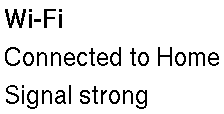
M is the screen's message type. Children are drawn in the order they were
added, the first at the top, each against the left edge unless
align says otherwise. How tall the column is, and what a
spacer in it does, is how a stack measures.
| Builder | Sets | When not called |
|---|---|---|
VStack::new | the gap between children, in pixels | — |
push · push_if · push_some · extend | the children, in order | no children: the stack measures zero |
align | where children sit across the column | Alignment::Start, the left edge |
The spacing is the framework's to lay out, not the theme's: pass a value from
Theme::metric when the gap should follow the device.
Example — a column built by hand
use xpui::{Text, VStack};
let column: VStack<()> = VStack::new(8)  .push(Text::new("Wi-Fi").bold())  .push(Text::new("Connected to Home"))  .push(Text::new("Signal strong"));
Example — a line only while it applies
use xpui::{Text, VStack};
let syncing = true;let warning: Option<&str> = None;
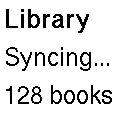
let column: VStack<()> = VStack::new(8)  .push(Text::new("Library").bold())  .push_if(syncing, Text::new("Syncing…"))  .push_some(warning.map(Text::new))  .push(Text::new("128 books"));
The chain keeps one type whichever way the conditions go, so body needs no
if whose branches would have to agree.
Example — rows from data
use xpui::{Text, VStack};
let networks = ["Home", "Office", "Library"];
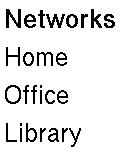
let column: VStack<()> = VStack::new(8)  .push(Text::new("Networks").bold())  .extend(networks.into_iter().map(Text::new));
Example — children of different types from data
use xpui::{Divider, Text, VStack, View, ViewExt};
let rows: Vec<Box<dyn View<()>>> = vec![  Text::new("Wi-Fi").boxed(),  Divider::new().boxed(),  Text::new("Bluetooth").boxed(),];let column = VStack::new(4).extend(rows);
Creating a stack
Section titled “Creating a stack”VStack::new
Section titled “VStack::new”A vertical stack with spacing pixels between children.
pub fn new(spacing: i32) -> Self| Parameter | Meaning |
|---|---|
spacing | Pixels between each pair of children, and none before the first or after the last. |
Adding children
Section titled “Adding children”VStack::push
Section titled “VStack::push”Appends a child.
pub fn push(self, child: impl View<M> + 'static) -> SelfTakes any view by value and boxes it, so a tree is built without Box::new.
The child must be a view for this stack's message type.
VStack::push_if
Section titled “VStack::push_if”Appends a child only when condition holds, so callers can build conditional trees without wrapping the whole chain in an if.
pub fn push_if(self, condition: bool, child: impl View<M> + 'static) -> SelfThe child is built either way, and dropped when condition is false. A child
left out takes no gap.
VStack::push_some
Section titled “VStack::push_some”Appends a child when there is one.
pub fn push_some(self, child: Option<impl View<M> + 'static>) -> SelfNone adds nothing, not even a gap.
VStack::extend
Section titled “VStack::extend”Appends every view an iterator yields, for lists built at run time.
pub fn extend<V: View<M> + 'static>(self, children: impl IntoIterator<Item = V>) -> SelfEvery item is one type. To mix types, box each to Box<dyn View<M>> first,
which is itself a view; ViewExt::boxed is the short way.
Arranging children
Section titled “Arranging children”VStack::align
Section titled “VStack::align”Positions children across the stacking axis, at Alignment::Start unless this is called.
pub fn align(self, alignment: Alignment) -> SelfIn a column, Start is the left edge, Center the middle and End the right
edge, all of the column's own width.
See also: HStack, vstack!, Spacer, Alignment
HStack
Section titled “HStack”Lays children out left to right.
pub struct HStack<M>(Stack<M>)
The same stack as VStack on the other axis, with the same builders.
Children run from the left, each against the top edge unless
align says otherwise: a row mixing an icon with a line of text
almost always wants Alignment::Center.
A row with no spacer in it is as wide as its children. A row with one is as wide as it was offered, which in a column is the width of the band.
Example — a row built by hand
use xpui::{HStack, Text};
let row: HStack<()> = HStack::new(24)  .push(Text::new("Books"))  .push(Text::new("Fonts"))  .push(Text::new("Notes"));
Creating a stack
Section titled “Creating a stack”HStack::new
Section titled “HStack::new”A horizontal stack with spacing pixels between children.
pub fn new(spacing: i32) -> SelfAdding children
Section titled “Adding children”HStack::push
Section titled “HStack::push”Appends a child.
pub fn push(self, child: impl View<M> + 'static) -> SelfHStack::push_if
Section titled “HStack::push_if”Appends a child only when condition holds, so callers can build conditional trees without wrapping the whole chain in an if.
pub fn push_if(self, condition: bool, child: impl View<M> + 'static) -> SelfHStack::push_some
Section titled “HStack::push_some”Appends a child when there is one.
pub fn push_some(self, child: Option<impl View<M> + 'static>) -> SelfHStack::extend
Section titled “HStack::extend”Appends every view an iterator yields, for lists built at run time.
pub fn extend<V: View<M> + 'static>(self, children: impl IntoIterator<Item = V>) -> SelfEach behaves as its VStack counterpart does.
Arranging children
Section titled “Arranging children”HStack::align
Section titled “HStack::align”Positions children across the stacking axis, at Alignment::Start unless this is called.
pub fn align(self, alignment: Alignment) -> SelfIn a row, Start is the top edge, Center the middle and End the bottom, all
of the row's own height: the tallest child's.
See also: VStack, hstack!, Alignment
vstack!
Section titled “vstack!”A vertical stack.
macro_rules! vstackvstack![spacing; child, child, …]vstack![spacing]Shorthand for a column whose children are fixed: it expands to
VStack::new(spacing) followed by one .push(child) per child, and hides
nothing. A trailing comma is allowed. The second form is an empty stack. Use the
builder when a child depends on a condition or comes from data:
push_if, push_some,
extend.
Example — a titled column with a footer
use xpui::{Spacer, Text, VStack, hstack, vstack};
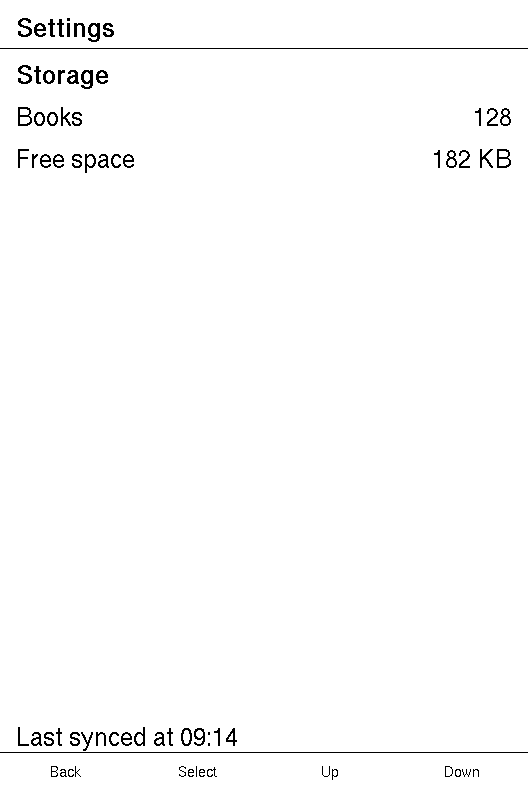
let column: VStack<()> = vstack![12;  Text::new("Storage").bold(),  hstack![8; Text::new("Books"), Spacer::new(), Text::new("128")],  hstack![8; Text::new("Free space"), Spacer::new(), Text::new("182 KB")],  Spacer::new(),  Text::new("Last synced at 09:14"),];
The spacer takes the height the other children leave, so the footer sits on the bottom of whatever band the column is given. Each row's own spacer pushes its value to the right edge.
Example — a macro stack in a screen
use xpui::{NavigationScreen, Screen, Text, View, vstack};
struct About;
impl Screen for About {  type Message = ();
  fn body(&self) -> impl View<()> {    NavigationScreen::new(vstack![16;      Text::new("Firmware").bold(),      Text::new("1.4.2"),    ])  }
  fn update(&mut self, _message: ()) {}
fn title(&self) -> Option<&'static str> { Some("About") }}hstack!
Section titled “hstack!”A horizontal stack, written the same way as vstack!.
macro_rules! hstackhstack![spacing; child, child, …]hstack![spacing]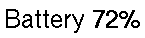
It expands to HStack::new(spacing) followed by one .push(child) per child.
Example — a label and its value
use xpui::{HStack, Text, hstack};
let row: HStack<()> = hstack![8; Text::new("Battery"), Text::new("72%").bold()];
Example — an icon-sized frame beside text

use xpui::{Alignment, HStack, Icon, IconRef, Modifiers, Text, hstack};
let row: HStack<()> = hstack![12;  Modifiers::<()>::frame(Icon::new(Glyph::Sun), 44, 44),  Text::new("Frontlight"),].align(Alignment::Center);
Without Alignment::Center the text sits against the top of the 44-pixel row.
The frame names its message type because Icon is a view for every one; see
Frame.
Example — a spacer between

use xpui::{HStack, Spacer, Text, hstack};
let row: HStack<()> = hstack![8; Text::new("Battery"), Spacer::new(), Text::new("72%")];
See also: HStack, Spacer, Alignment
Alignment
Section titled “Alignment”Where children sit across the stacking axis.
pub enum Alignment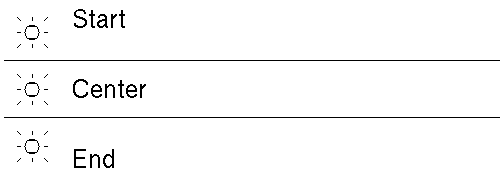
| Variant | |
|---|---|
Alignment::Start | Against the leading edge: left in a vstack!, top in an hstack!. |
Alignment::Center | Centred across the stack. |
Alignment::End | Against the trailing edge: right in a vstack!, bottom in an hstack!. |
Start is the default, which a row mixing a 32-pixel icon with a line of text
almost never wants: the text hangs off the top. It is Copy, Default,
Debug and Eq.
Example — the three alignments side by side
use xpui::{Alignment, Divider, HStack, Icon, IconRef, Modifiers, Text, VStack, hstack, vstack};
fn aligned(alignment: Alignment, label: &'static str) -> HStack<()> {  hstack![12; Modifiers::<()>::frame(Icon::new(Glyph::Sun), 56, 56), Text::new(label)]    .align(alignment)}
let rows: VStack<()> = vstack![0;  aligned(Alignment::Start, "Start"),  Divider::new(),  aligned(Alignment::Center, "Center"),  Divider::new(),  aligned(Alignment::End, "End"),];assert_eq!(Alignment::default(), Alignment::Start);
See also: VStack::align, HStack::align